
Name the question
Decide whether you are checking loss, capacity, addressing or backup time, then open that tool.
TELECOM AND NETWORK ENGINEERING
Fiber, IP, wireless and power sit in one set of pages. Each page states the formula, the assumptions and the limits. The numbers stay in this browser.
The library is grouped by the engineering problem, not by a flat menu. Pick a path, then open the calculator that answers it.
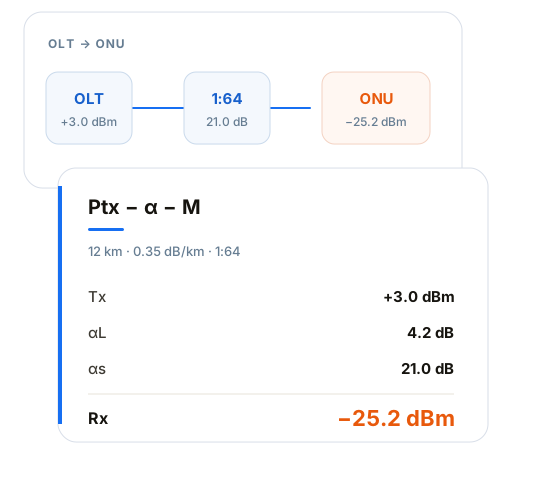
Check loss and optical budget before splitter ratio, reach and ONU receive level. If a field reading is weak, compare the OTDR events with the design before changing hardware.
Start with optical budgetTurn offered load into uplinks and addresses. Bandwidth, oversubscription, subnets, VLANs and MTU belong in one check.
Start with bandwidthPoE, the rack, PUE, cooling, UPS and the generator have to follow the same load. Leave PoE or cooling out and the generator comes out small.
Open power and coolingCoverage and capacity size the APs. The transport ring and the OLT uplinks decide what remains after a failure. The assumptions have to match.
Start with Wi-Fi planningUse a result to compare options and narrow a fault. Final design and acceptance still need the equipment data and a field measurement.
Decide whether you are checking loss, capacity, addressing or backup time, then open that tool.
Use the design value or the field reading. Follow the units, efficiency and margin written on that page.
Read the formula, the scope and the result limit. A standard that is not cited on the page has not been claimed.
Bits or bytes, margin inside the loss, aging inside the runtime: the tool page says which one it used. Read that before you carry the number to another page.
Running a calculation does not send the inputs to the site. Tools that keep a history store it on this machine.
Use it to compare options and narrow a fault. Vendor data, a field meter and the formal design still have to be checked.
A calculator returns a number. A topic or a guide says where that number sits in the design.
Check uplink bandwidth, aggregation and what remains at N-1.
Connect heat load, PUE and cooling-plant selection.
Rectifiers, battery runtime, generators and solar in one backup discussion.
Write the uplink bandwidth and the capacity margin so someone else can repeat it.
Estimate the heat the room must remove before you select plant.
Judge the access uplink from the actual traffic, not from a fixed ratio.
Use this when you already know the field. Use the search at the top when you know the name.
No. Results support planning, comparison, review and fault analysis. They do not replace vendor data, a field test, a formal design or an acceptance test.
No. The calculation runs in the browser. Tools that keep a history store it on this machine. Optional analytics load only after you allow them.
On the tool page. When a page uses a formula, the formula and the units are written there. If a page does not cite a standard, it is not claiming one.
The site is in English, Simplified Chinese and Spanish. Some tools exist in all three. Use the language control at the top of the page.